MVVM in Unreal
When people say “MVVM” in an Unreal conversation, they’re usually mixing up two different things. One is a design pattern (opens in a new tab) that existed long before Unreal had a UI framework worth arguing about. The other is Epic’s UMG Viewmodel plugin (opens in a new tab) (it shows up as ModelViewViewModel in the plugin list), which is Epic’s take on that pattern.
If you work on UI as an engineer or a technical designer, you should understand both. The pattern is a way of organizing code so the UI stays separate from the data and logic behind it, and the plugin is one implementation of it. If you only know the plugin, you can get bindings working, but you’ll spend a lot of time confused about why they’re set up the way they are. If you only know the pattern, you’ll have a lovely whiteboard diagram and some nods in the meeting room :)
I’ve been building a small UI sandbox in UE 5.8 to practise this: a first-person RPG HUD with health, stamina and mana bars, an interact prompt, and toasts when you pick something up. All the examples below come from it.
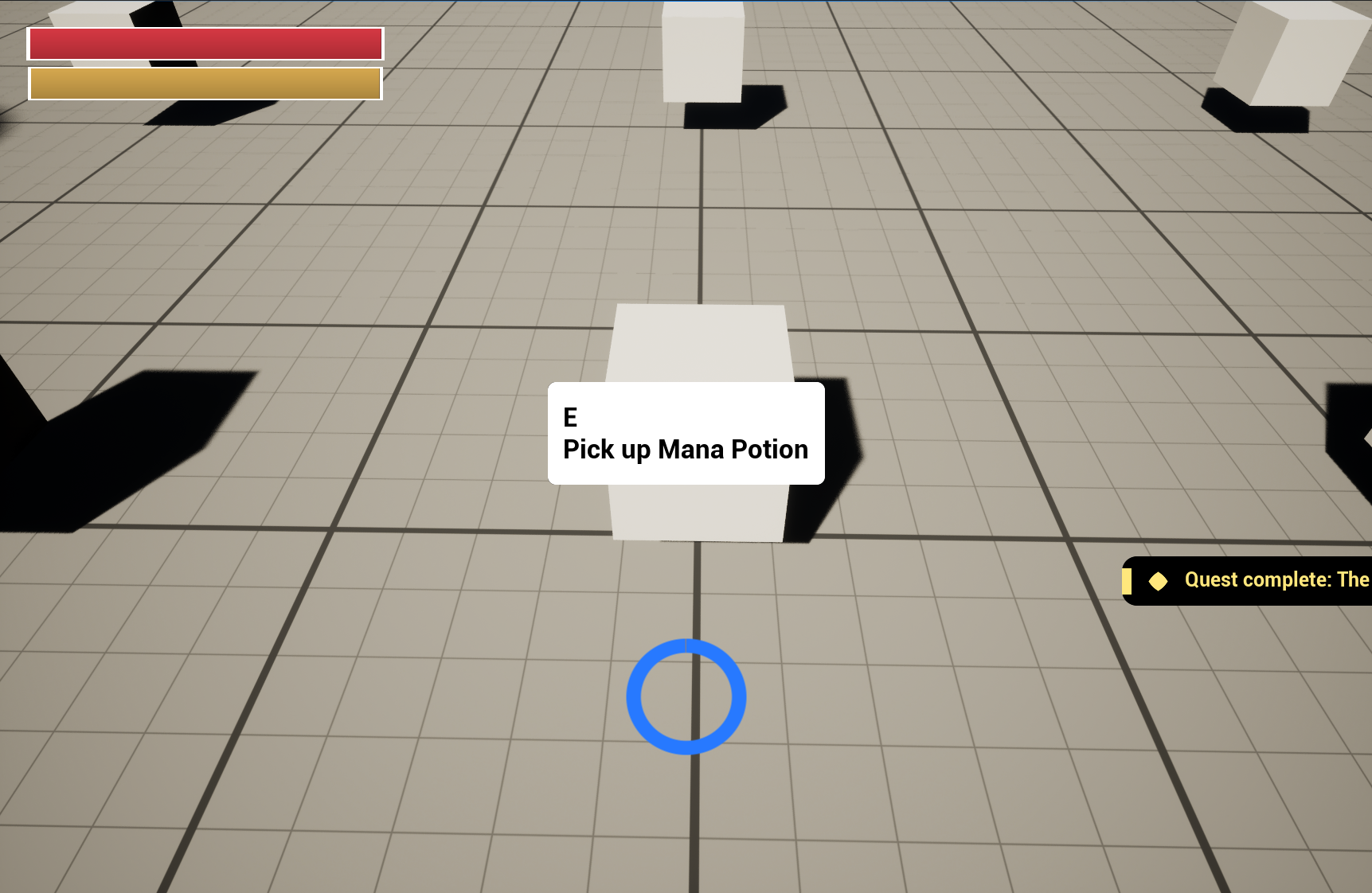
Illustrating the Pattern
MVVM stands for Model, View, ViewModel. It grew out of what Martin Fowler called the Presentation Model (opens in a new tab), and Microsoft named it MVVM when they built WPF around it. Here’s how the pieces map onto my HUD:
- Model: gameplay state.
UUISStatsComponentlives on the player controller and owns health, stamina and mana. It has no idea the UI exists. - View: the widgets, like
WBP_HUDandWBP_ProgressBar. They handle presentation and shouldn’t know anything about gameplay. - ViewModel: the gatekeeper between them. It listens to the model, keeps the values in a shape the UI can use directly (0.7 for a bar, “70 / 100” for a label), and tells anyone listening when something changes.
The view never reaches into gameplay, and gameplay never touches a widget. Both of them talk to the ViewModel and nothing else. Because of that, I can rebuild the whole HUD without opening the stats component, or rebalance stats without opening a single widget.
Next values go through the ViewModel, and moments get broadcast as events. Health is a value. Taking damage is a moment.
Before the Plugin…
Before the plugin, I’d done this entirely in code. Gameplay systems were handed UObjects with interfaces, and keeping those objects up to date on the client was their job. The UI read from the same objects to populate itself, and called back through them to trigger gameplay features.
It worked, and artists liked it because they could build screens against a stable set of objects without caring where the data came from. The catch was that code decided what data got surfaced. Whenever a screen needed something new, an engineer had to go add it.
That’s where I’ve found the plugin is most valuable!
UMG Viewmodel/MVVM Plugin
Out of everything the plugin gives you, these three are the ones I care about most:
- FieldNotify (opens in a new tab). This lets a UObject announce that a property (or a getter) just changed. Bindings listen for those announcements, so nothing has to poll. Compare that to the classic UMG “Bind” dropdown, which re-evaluates every frame and has earned its reputation for performance problems.
- View Bindings (opens in a new tab) in the editor. A designer picks a ViewModel field on the left and a widget property on the right, and that’s the whole job. They don’t need a graph or an engineer for it.
- Creation types (opens in a new tab). Every widget has to declare where its ViewModel comes from. It can create its own instance, have one handed to it manually, or look one up by name in a global collection. I lean towards the global collection whenever I can, because it saves a lot of plumbing.
In my old setup, the engineer surfaced the data and also decided how it reached the screen. With the plugin, the engineer exposes a ViewModel once, and design and art can hook it up to whatever widgets they want, whenever they get to it.
In C++
Start with Build.cs. If you skip this, you’ll get a link error that doesn’t make it obvious what’s missing. The plugin’s modules need to be in your dependencies (Epic covers this under required setup (opens in a new tab)):
PublicDependencyModuleNames.AddRange(new string[] {
    "Core", "CoreUObject", "Engine", "UMG",
    "ModelViewViewModel", "FieldNotification"
});
A ViewModel
ViewModels subclass UMVVMViewModelBase. Raw values are UPROPERTYs marked FieldNotify, with a setter and a getter. This is a trimmed-down version of my HUD’s stats ViewModel:
UCLASS(BlueprintType)
class UUISVM_PlayerStats : public UMVVMViewModelBase
{
    GENERATED_BODY()

public:
    void Initialize(UUISStatsComponent* Stats);

    UPROPERTY(BlueprintReadOnly, FieldNotify, Setter, Getter, Category = "Stats")
    float Health = 100.f;

    UPROPERTY(BlueprintReadOnly, FieldNotify, Setter, Getter, Category = "Stats")
    float MaxHealth = 100.f;

    // Derived values: FieldNotify functions
    UFUNCTION(BlueprintPure, FieldNotify, Category = "Stats") float GetHealthPercent() const;
    UFUNCTION(BlueprintPure, FieldNotify, Category = "Stats") FText GetHealthText() const;
    UFUNCTION(BlueprintPure, FieldNotify, Category = "Stats") bool GetIsLowHealth() const;

    float GetHealth() const { return Health; }
    void SetHealth(float NewValue);
    // ...MaxHealth, Stamina and Mana follow the same shape
};
Pay attention to the derived getters at the bottom. GetHealthPercent doesn’t store a value. It calculates one from Health and MaxHealth, so when health changes, the setter also has to tell everyone that those getters changed (Epic’s docs on the macros (opens in a new tab)):
void UUISVM_PlayerStats::SetHealth(float NewValue)
{
    if (UE_MVVM_SET_PROPERTY_VALUE(Health, NewValue))
    {
        UE_MVVM_BROADCAST_FIELD_VALUE_CHANGED(GetHealthPercent);
        UE_MVVM_BROADCAST_FIELD_VALUE_CHANGED(GetHealthText);
        UE_MVVM_BROADCAST_FIELD_VALUE_CHANGED(GetIsLowHealth);
    }
}
UE_MVVM_SET_PROPERTY_VALUE only assigns and broadcasts when the value actually changes, and it returns true if it did. Without that check, a health bar sitting at full would keep pinging every widget bound to it.
I keep formatting and thresholds in getters like these instead of in Blueprint. Turning health into “70 / 100”, or deciding that under 25% counts as low, is UI logic, but I want it in one place where I can test it.
The model stays simple. The ViewModel subscribes to the stats component’s delegate and pushes the new values through its setters:
void UUISVM_PlayerStats::Initialize(UUISStatsComponent* Stats)
{
    Stats->OnStatChanged.AddDynamic(this, &ThisClass::HandleStatChanged);
    // ...then pull the current values once so the HUD doesn't start blank
}
Where ViewModels live
The player’s ViewModels get created in a ULocalPlayerSubsystem (opens in a new tab), which sticks around for as long as the local player does. From there, each one is registered by name in the plugin’s global collection (opens in a new tab), so any widget can ask for “PlayerStats” without caring who created it.
void UUISViewModelSubsystem::Register(FName Name, UMVVMViewModelBase* ViewModel)
{
    UMVVMGameSubsystem* MVVM = GetLocalPlayer()->GetGameInstance()->GetSubsystem<UMVVMGameSubsystem>();

    FMVVMViewModelContext Context;
    Context.ContextClass = ViewModel->GetClass();
    Context.ContextName = Name;

    // A previous PIE session's instance may still be registered under the same context.
    MVVM->GetViewModelCollection()->RemoveViewModel(Context);
    MVVM->GetViewModelCollection()->AddViewModelInstance(Context, ViewModel);
}
I trimmed the null checks out for the blog (the real version has them). The RemoveViewModel call is there because PIE (Play In Editor) can leave the previous session’s ViewModel registered. Debugging a widget that’s happily bound to data from your last play session is a special kind of confusing.
Order matters too. My player controller creates and binds the ViewModels first, and only then creates the HUD. If a widget initializes before its global ViewModel exists, the binding quietly does nothing.
Lists
ListViews work with UObjects, so the toast ViewModel exposes its toasts as a TArray<UObject*> through a FieldNotify getter. That binds directly to the ListView’s Set List Items (opens in a new tab) function, no conversion needed:
void UUISVM_Notifications::SetToasts(const TArray<TObjectPtr<UUISVM_Toast>>& InValue)
{
    if (Toasts == InValue) { return; }
    Toasts = InValue;
    UE_MVVM_BROADCAST_FIELD_VALUE_CHANGED(Toasts);
    UE_MVVM_BROADCAST_FIELD_VALUE_CHANGED(GetToastObjects);
}
Each toast is its own tiny ViewModel, and the notifications ViewModel removes it when its timer runs out. The list widget has no idea a pickup happened. All it ever sees is a new array.
The Blueprint Side
Designers spend most of their time on this side, so it’s worth knowing well even if you’re in C++ all day.
My bars start from WBP_ProgressBar, a generic bar that only knows how to draw a percent and has no ViewModel at all. WBP_HealthBar, WBP_StaminaBar and WBP_ManaBar inherit from it, and those three are where the ViewModel goes. That way the base bar stays reusable for enemies or quest progress, and each child is openly a “player health bar” (or stamina, or mana) whose whole job is knowing about player stats.
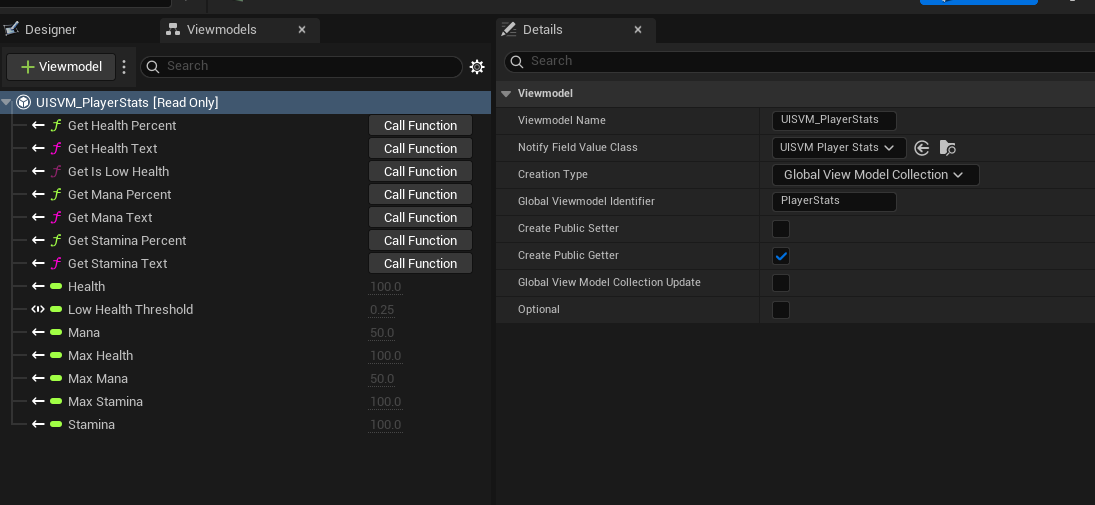
To connect the health bar to its VM, you would open WBP_HealthBar and go to Window > Viewmodels. Once you add UISVM_PlayerStats and set its Creation Type to Global Viewmodel Collection, and give it the name PlayerStats, you have told the widget where its ViewModel comes from.
Next, we create a binding. Window > View Bindings. Each row connects a source (a ViewModel field or getter) to a destination (a widget property or function). In WBP_HealthBar, there’s one binding: GetHealthPercent goes to the bar’s Percent. The stamina and mana bars do the same with GetStaminaPercent and GetManaPercent. You don’t write any graph nodes for this.
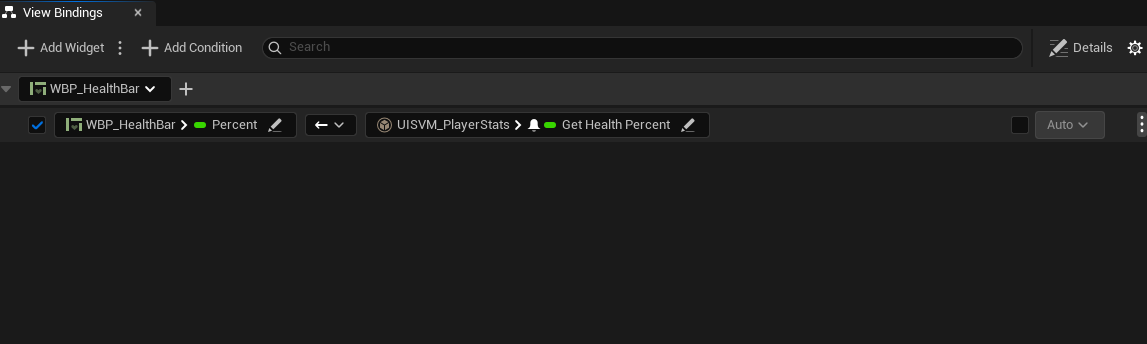
This is where the global collection earns its keep. Three separate widgets each ask for PlayerStats by name and all get the same instance. The HUD doesn’t pass anything down to them, and it doesn’t need to know they use a ViewModel at all.
Bindings didn’t fully make sense to me until I got comfortable with two things.
The first was conversion functions (opens in a new tab), which you need because types don’t always line up. My interact prompt’s ViewModel has a bool for whether the prompt is visible, but a widget’s Visibility isn’t a bool. A conversion function sits in the middle of the binding and turns true into SelfHitTestInvisible and false into Collapsed.
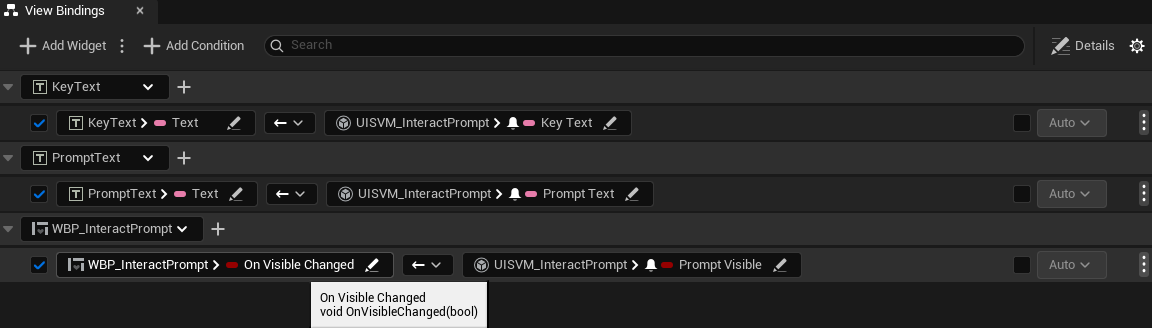
The second was binding to a function. A binding’s destination can be a function instead of a property, and any widget function with one parameter will show up in the list. Rather than binding visibility directly and having the prompt pop in and out, I bound IsPromptVisible to a small OnVisibleChanged(bool) function that plays a fade animation forwards or backwards. The ViewModel only ever says “visible” or “not visible”, and the widget turns that into a 0.15 second fade.
The controller works out what you’re looking at, and the ViewModel holds onto that.
When C++ Needs to Listen Too
C++ can listen to ViewModels as well. My HUD’s C++ base class subscribes to one field so it can loop the low-health pulse animation:
LowHealthHandle = BoundStats->AddFieldValueChangedDelegate(
    UUISVM_PlayerStats::FFieldNotificationClassDescriptor::GetIsLowHealth,
    INotifyFieldValueChanged::FFieldValueChangedDelegate::CreateUObject(
        this, &ThisClass::HandleLowHealthField));
The editor bindings use this same mechanism under the hood. Make sure you remove the delegate in NativeDestruct, unless you enjoy getting callbacks on a widget that’s already gone.
The damage flash works differently. It’s triggered by the stats component’s OnDamaged event, not the ViewModel, because being at low health is a state you can bind to, but getting hit is something that happens once.
Things That Got Me and Might Get You Too
- Forgetting where the ViewModel comes from. You add a ViewModel to a widget, set up all your bindings, and forget to set the creation type. Nothing happens, and you won’t see an error. You just get a HUD full of default values.
- Typos in global names. If C++ registers
PlayerStatsand the widget asks forPlayerStat, you get the same silence. When a binding does nothing, check the name before you go looking for anything clever. - Figuring out how bindings actually behave. Conversion functions, function destinations, and why some getters show up in the list and others don’t. It’s quick once you get it, but poking around the editor alone didn’t get me there.
- The docs. They’re thin in places. I used AI to help write the C++ for this sandbox while I worked out the architecture, and having it walk me through the codebase filled in a lot of what the docs left out.
Is It Worth It?
I’m sold on the pattern. Whether or not to use the plugin is a bit more complicated, though.
The pattern is good separation. Gameplay doesn’t know about widgets, widgets don’t know about gameplay, and the ViewModel is the agreement between them. I can and do use it on pretty much anything with a real UI, plugin or no plugin.
The plugin pays for its setup on games with a lot of data and a lot of UI: action RPGs, big shops and inventories, or anything where the screens keep changing throughout development. It helps most when engineering and design or art need to work on their own schedules. In a game like Baldur’s Gate 3 or Slay the Spire, where the UI is most of what you’re looking at, I’d want it.
For a prototype, a small team, or a game that only has a health bar and a pause menu, it’s more than you need. A plain UObject ViewModel with a couple of delegates gives you the pattern without the editor setup, and if the UI grows later, it’s an easy move to the plugin. That easy move is a good reason to learn the pattern first.
If you made it this far, thanks for taking the time to read. If you have questions about UI on any project, whether in a game engine, app or the web, email me at hello@dominic-sabatier.ca.